 SQL Database
Let agents answer questions by querying your PostgreSQL, MySQL/MariaDB or SQL Server database: they get the schema of the tables you share and run read-only SQL against the live data. Chosen columns can be ingested as knowledge too.
Before you start
Make a login for this, with SELECT and nothing else, on only the tables
agents should reach. Every query is checked to be a single SELECT and run
in a read-only transaction that is always rolled back, but the login's grants
are the real guarantee.
PostgreSQL:
CREATE ROLE agents_readonly LOGIN PASSWORD 'a-long-random-password';
GRANT USAGE ON SCHEMA public TO agents_readonly;
GRANT SELECT ON public.orders, public.products TO agents_readonly;
MySQL / MariaDB:
CREATE USER 'agents_readonly'@'%' IDENTIFIED BY 'a-long-random-password';
GRANT SELECT ON shop.orders TO 'agents_readonly'@'%';
GRANT SELECT ON shop.products TO 'agents_readonly'@'%';
SQL Server:
CREATE LOGIN agents_readonly WITH PASSWORD = 'a-long-random-password';
USE Shop;
CREATE USER agents_readonly FOR LOGIN agents_readonly;
GRANT SELECT ON dbo.Orders TO agents_readonly;
GRANT SELECT ON dbo.Products TO agents_readonly;
The database must be reachable from the internet: allow our outbound IP
address in its firewall or security group (ask us for it). localhost and
private addresses are refused.
Set it up
-
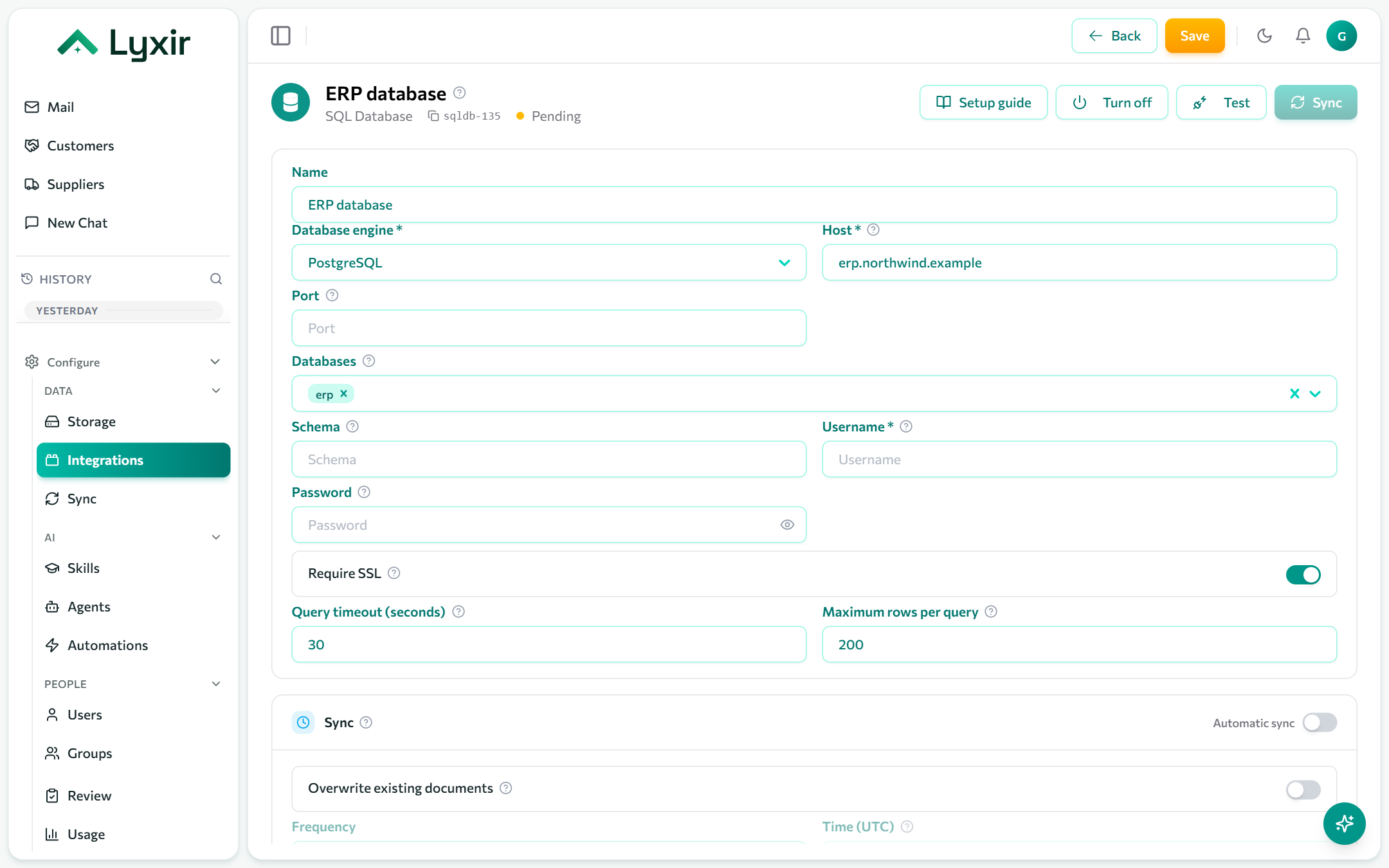
Integrations → Add → SQL Database.
-
Fill in the form:
Field What goes there Database engine PostgreSQL, MySQL / MariaDB or Microsoft SQL Server. Host Hostname or IP address. Port Empty: the default (5432, 3306, 1433). Databases Type a name and press Enter. The first is the one connected to; add more on the same server the login may read (SQL Server and MySQL only). Required for PostgreSQL and MySQL. Schema Defaults to public(PostgreSQL) ordbo(SQL Server). Empty for MySQL.Username / Password The read-only login. Require SSL Leave on for anything across the internet. RDS, Azure SQL and Cloud SQL all accept it. Query timeout / Maximum rows per query Limits on each query. Rows past the cap are dropped and the agent is told the answer was cut short. -
Save. Every save tests the connection.
Map the tables
Turn on Enable table mapping and pick, under Tables and columns shared, the tables and columns agents may see. Describe what each means: the descriptions are what agents write SQL from, so "status: 1 open, 2 shipped, 3 cancelled" is worth more than the column name. A table picked with no columns ticked shares all of them. The mapping assistant can draft descriptions for you.
With mapping off, agents get no schema and look tables up themselves.
As knowledge
A mapped table can also be ingested, one document per row: pick which columns are its title, its content, files and metadata. Sync, OCR and exclusions: see Common settings.
Give it to an agent
In the agent builder, under Tools, grant the connection's query tools. The table brief comes with them as a skill.